Mahogany Garden: A Script Font for Chic Web Design
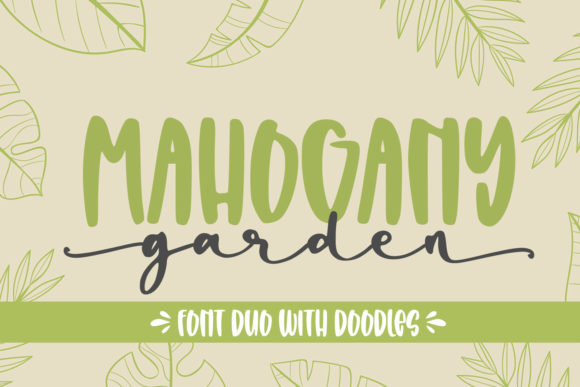
In the world of digital design, typography is not merely about legibility; it is about setting a mood. As web designers and UI creators, we are constantly searching for typefaces that can bridge the gap between professional structure and personal warmth. Mahogany Garden is a lovely duo font featuring two distinct styles: handwritten script and decorative dingbats. Together or apart, these fonts are ideal for adding a chic and cheery touch to your crafts and digital projects.
For those building online stores, creative portfolios, or brand-focused web experiences, finding the right script font can be a challenge. Many scripts are difficult to read on small screens or clash with modern, minimalist layouts. Mahogany Garden offers a solution that balances aesthetic appeal with functional versatility. This premium font is PUA encoded, which allows for extensive customization and integration into complex design systems without breaking the visual flow.
Visual Personality and Digital Appeal
Mahogany Garden exudes a sense of organic elegance. The handwritten style mimics the natural flow of ink on paper, providing a human touch that is often missing in rigid, geometric sans serif fonts. This makes it an excellent choice for brands that want to appear approachable, artistic, and authentic. Whether you are designing a landing page for a boutique skincare line or a header for a freelance photographer’s portfolio, this creative font adds immediate character.
The inclusion of dingbats is particularly valuable for digital product creators. These decorative elements allow you to create custom icons, bullet points, or dividers that match the tone of your text. Instead of relying on generic SVG icons, you can use the dingbats from Mahogany Garden to maintain a cohesive visual identity across your website. This consistency strengthens your brand identity and ensures that every element feels intentionally designed.
Strategic Placement in Web Layouts
One of the most common mistakes designers make with display fonts is overusing them. To maximize the impact of Mahogany Garden, consider its role in your visual hierarchy. It performs best as a headline or accent type rather than body copy. Here is how you can strategically place it:
- Hero Sections: Use the main script style for large, impactful headlines. Pair it with ample negative space to let the curves of the letters breathe. This draws the user’s eye immediately to your value proposition.
- Call-to-Action Areas: For buttons or short phrases like "Shop Now" or "Learn More," the script can add a playful nudge. However, ensure the contrast is high enough for accessibility.
- Blog Graphics and Social Media: When creating graphics for social media or blog headers, the dingbats can frame your text beautifully. They act as visual anchors that guide the reader through the content.
- Digital Product Covers: If you sell digital templates, courses, or e-books, Mahogany Garden is perfect for cover art. The combination of script and dingbats creates a polished, finished look that suggests quality.
Readability and Responsive Design Considerations
While Mahogany Garden is charming, readability remains paramount in web design. On mobile screens, where screen real estate is limited, long paragraphs in a script font can become exhausting to read. Therefore, always reserve the script for short phrases, titles, or decorative accents. Use a clean sans serif font or a highly readable serif font for your body text.
When implementing this font in responsive layouts, pay attention to font sizes. At smaller breakpoints, the intricate details of the handwriting may blur or become indistinct. Test your designs at various viewports to ensure the script maintains its clarity. Additionally, consider background contrasts. On dark backgrounds, the script should have sufficient weight to stand out. On light backgrounds, avoid overly thin strokes that might get lost against images or patterns.
For image overlays, such as hero banners with background photos, use the script sparingly. The complexity of the letterforms can compete with busy imagery. In these cases, the dingbats can serve as subtle decorative elements that do not obstruct the primary message.
Font Pairing for Modern Typography
To create a balanced and professional look, pair Mahogany Garden with complementary typefaces. The goal is to contrast the organic, flowing nature of the script with a structured, neutral typeface.
A classic pairing involves using a geometric sans serif font for body copy and navigation. Fonts like Helvetica, Open Sans, or Montserrat provide a clean canvas that allows the script to shine without overwhelming the user. This combination works exceptionally well for landing pages where clarity and conversion are key.
Alternatively, for a more editorial or sophisticated brand tone, pair the script with a traditional serif font. This pairing evokes a sense of timelessness and luxury, making it suitable for high-end fashion blogs, wedding planners, or artisanal food brands. The key is to maintain a clear distinction in weight and style so that users can easily differentiate between headings and body text.
Technical Implementation and Licensing
As a PUA encoded font, Mahogany Garden offers flexibility for developers and designers who need to map specific characters to their own Unicode values. This is useful when integrating custom icons or symbols into a CSS sprite sheet or a custom icon font. Before purchasing, check the included file formats to ensure compatibility with your workflow. Most premium fonts include OTF, TTF, and webfont formats (WOFF/WOFF2), which are essential for fast loading times on websites.
It is also crucial to review the licensing terms. Ensure that the license covers your intended use, whether it is for client projects, online stores, or digital templates. Commercial licenses typically allow you to use the font in web design, branding, and marketing materials, but they may restrict redistribution of the font files themselves. Always verify that you have the right to embed the font in your web projects to avoid legal issues.
Conclusion
Mahogany Garden is more than just a decorative typeface; it is a tool for enhancing user engagement and reinforcing brand personality. By understanding its strengths and limitations, you can integrate it seamlessly into your digital products. Whether you are crafting a cozy online shop or a stylish portfolio, this handwritten font brings a level of charm and professionalism that resonates with modern audiences. Embrace the duality of script and dingbat to create web experiences that are both visually striking and functionally sound.